
Sessions management
Save and organise thousands of SSH, RDP, telnet and serial sessions in a searchable tree, grouped by folders, tags and colors.
Tabbed SSH, built-in X11 server, SFTP browser, RDP, XDMCP and a full network toolbox — in one window. Built for engineers who live in the terminal.
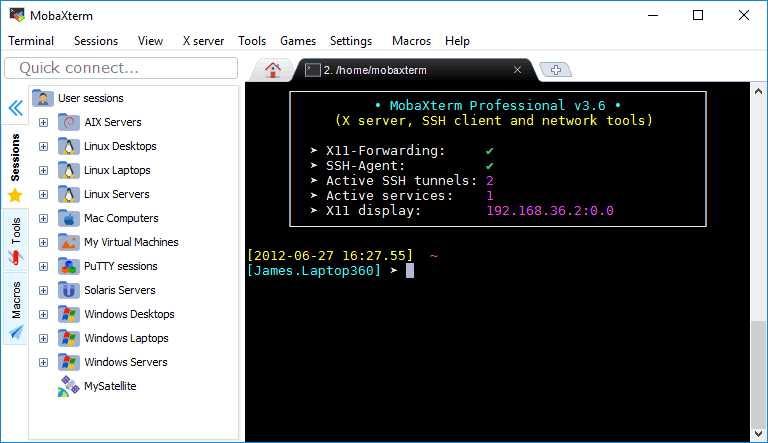
A terminal, an SSH client, an X server, a file transfer tool and a network toolbox — all in the same place, with no plumbing to wire up.
Each feature is built in and works out of the box. No plugins, no extra installers, no configuration to copy from a tutorial.
Save and organise thousands of SSH, RDP, telnet and serial sessions in a searchable tree, grouped by folders, tags and colors.
Drag-and-drop files between your machine and any SSH host, with a side-by-side dual-pane explorer that opens automatically with each session.
Configure jump hosts once. Reach private hosts through bastions
without dropping back to ProxyJump in a config
file.
Local, remote and dynamic SOCKS forwarding from a visual UI. No
more remembering -L, -R,
-D flags.
Launch full Linux desktop sessions over the network with the embedded X11 server — no third-party X server required.
RDP sessions live next to your terminals in the same window. Switch between them as easily as switching tabs in a browser.
Type once, broadcast to every selected session. Roll out config changes across a fleet of servers in real time.
Bundled ping, traceroute, netstat, nslookup, port scanner, SSH keygen, sha1/md5 hash — over 100 ready-to-use Unix tools.
One-click TFTP, FTP, HTTP, NFS, Cron and SSH servers for local testing, file transfers and quick demos.
Install hundreds of additional Unix tools and libraries on the fly. Apt-style packages for Windows, with zero environment setup.
Edit local and remote files inline with a tabbed editor, integrated diff viewer and direct save-back to the SSH host.
Live coloring for log files, configs and source code right inside the terminal — not after the fact in a separate viewer.
Record keystrokes and replay them on demand or on session start. Automate the same five commands you type every morning.
Master-password protected vault for SSH keys, passwords and passphrases. Auto-fill on connect, never paste into a session by hand.
Brand the app for your team: custom themes, logo, default settings and feature gates — ship a tailored build to every engineer.
Install mobaXterm in under a minute. Free for personal use, no account required.